Introduction
If you are searching for a Gemini AI image prompt or ChatGPT image prompt that creates a realistic bike riding photo without changing your face, then this style is trending right now. Keywords like Royal Enfield AI photo edit, iPhone camera AI photo, realistic bike portrait, and face lock AI prompt are becoming popular because users want natural, real-looking edits instead of overly cinematic or fake AI images.
Today, AI tools are powerful enough to create images that look like they were shot on a real smartphone. The iPhone camera look is highly in demand because it feels natural, clean, and authentic. People prefer this over heavy filters or cinematic effects.
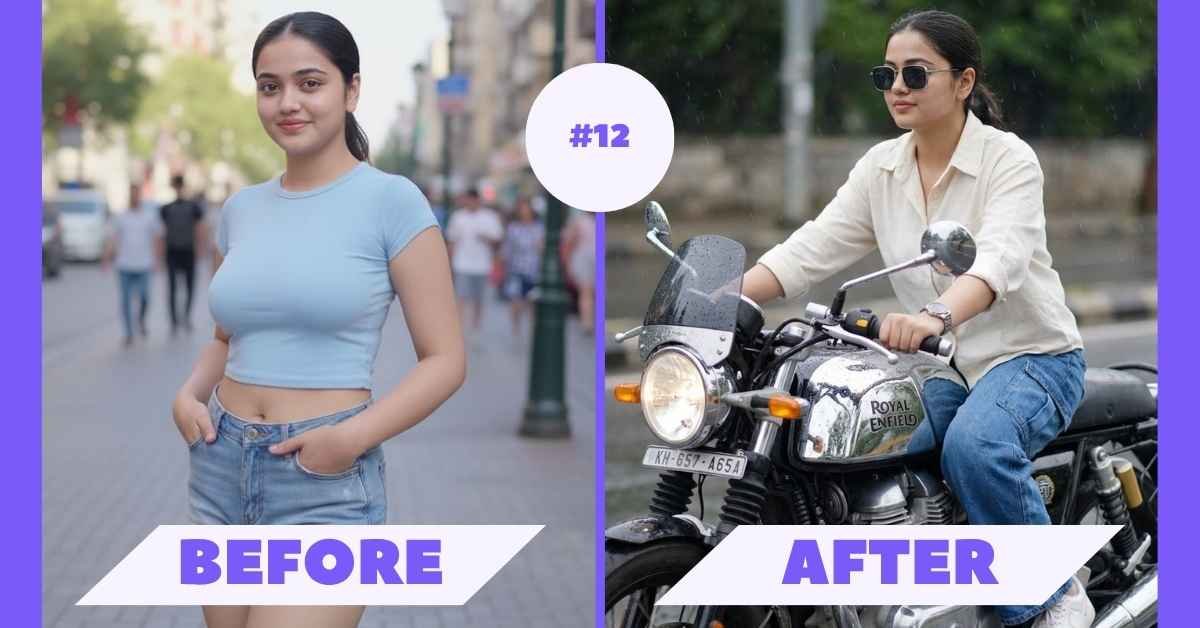
In this blog, you will get a ready-to-use Gemini AI image prompt and ChatGPT image prompt that helps you create a photo-realistic Royal Enfield bike shot in a rainy environment — while keeping your face exactly the same. No smoothing, no beautification, no fake skin — just real identity and natural photography.
Preview Expected Output Style
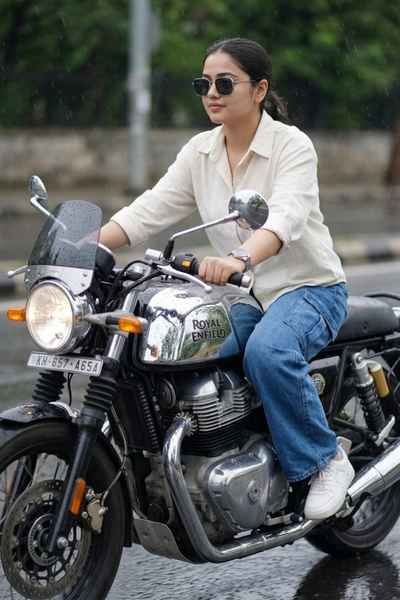
This edit includes:
- Royal Enfield Continental GT-650 bike
- Rainy day realistic environment
- Natural iPhone camera style shot
- Casual modern outfit
- Real skin texture (no smoothing)
- 100% same face (no AI change)
Gemini AI Image Prompt / ChatGPT Image Prompt
Use the uploaded image as the only face reference and create a photo-realistic shot as if captured on an iPhone 15 Pro Max camera, featuring the same person riding a chrome Royal Enfield Continental GT-650 motorcycle on a dark rainy day. Strictly maintain 100% face identity — the facial features, structure, skin tone, eyes, nose, lips, hairstyle, and proportions must remain exactly the same as in the reference image. Do not modify, beautify, retouch, smooth, sharpen, or stylize the face in any way, and avoid any face swap or AI enhancement. The subject should be slightly leaned forward while riding, looking toward the road with a calm and relaxed expression. The outfit should include a boxy fit off-white button-down shirt, loose blue baggy-fit jeans, clean white sneakers, a metal wristwatch, and square frame dark lens sunglasses, with no additional accessories. Ensure the motorcycle branding “Royal Enfield” is clearly visible on the tank with realistic metallic reflections and detailed engine textures. Capture the scene from a slight side angle with a natural smartphone perspective, maintaining sharp but realistic focus, slight natural grain, balanced exposure, and true-to-life colors. The skin texture should remain natural with visible pores, no smoothing or filters, and no cinematic color grading, ensuring an authentic iPhone camera look while keeping the face completely unchanged from the original image.
How To Use This Prompt Step-by-Step
- Open Gemini AI or ChatGPT
- Upload your clear face image
- Paste the prompt
- Click generate
- Wait for processing
- Download your final image
Tip: Use a sharp, high-quality face photo for best output.
Why This Prompt Is Trending
1. Realistic iPhone Camera Look
This style avoids heavy editing and gives a natural smartphone photography feel.
2. Bike + Lifestyle Aesthetic
Royal Enfield bike edits are very popular among Indian users.
3. No Fake Skin or Filters
Unlike other AI edits, this keeps real skin texture and details.
4. Face Lock Technology
Your face stays 100% original, which builds trust and authenticity.
Pro Tips for Best Results
- Use a front-facing clear image
- Avoid low-light original photos
- Keep expression natural
- Use neutral background in original image
- Try different lighting prompts
- gemini ai image prompt
- chatgpt image prompt
- royal enfield ai photo edit
- bike ai photo editing prompt
- iphone camera ai photo
- face lock ai prompt
- realistic ai photography
Best Use Cases
You can use this AI image for:
- Instagram reels and posts
- WhatsApp DP
- Bike lover content
- Personal branding
- Social media aesthetics
Gemini vs ChatGPT
| Feature | Gemini | ChatGPT |
| Speed | Fast | Moderate |
| Detail | Good | Excellent |
| Face Lock | Good | Best |
| Realism | High | Very High |
👉 For best results, try both and compare.
🚀 Advanced Prompt Tips
Add these lines for better accuracy:
- “use exact facial embedding”
- “no AI reconstruction of face”
- “preserve original facial geometry”
Common Mistakes
- Using blurry photos
- Missing face lock instruction
- Over-editing prompts
- Ignoring lighting conditions
Final Words
If you want a realistic bike riding AI photo, this prompt is one of the best options.
It gives a natural iPhone camera feel, realistic environment, and keeps your face completely unchanged.
No fake edits, no over-processing — just your real identity with a premium look.
Use this Gemini AI image prompt or ChatGPT image prompt today and create your own Royal Enfield photo in seconds.